
Practical guide
Restaurant order accuracy with QR ordering
A practical guide to reducing avoidable restaurant order mistakes with clearer guest choices, table context, staff review, and kitchen handoff.

Accuracy starts before the kitchen
Restaurant order accuracy is not only a kitchen problem.
Many mistakes start earlier: the table is unclear, a modifier is missed, a guest note is rushed, or staff has to translate a verbal request while service is already busy. QR ordering can help when it makes the guest choice clearer and keeps the order connected to the table.
The important word is help. QR ordering does not magically remove mistakes. It reduces avoidable ones when the restaurant keeps a review step before kitchen work begins.
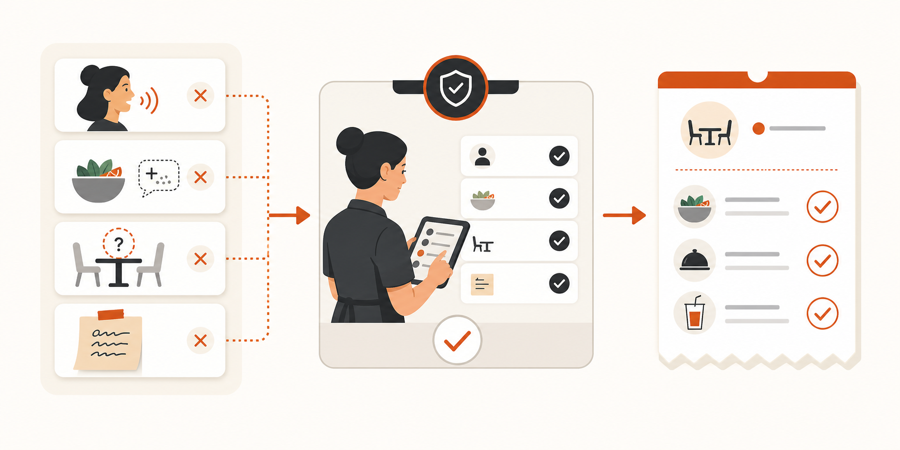
Where order mistakes usually start
Most avoidable mistakes come from small gaps in the service flow.
| Risk | What usually happens |
|---|---|
| Missing table context | Staff or kitchen has to guess where the order belongs |
| Unclear modifiers | A choice like sauce, size, or allergy note is missed |
| Rushed verbal relay | Staff hears the order correctly, but writes it down under pressure |
| Sold-out item | Guest orders something that should have been hidden |
| Notes separated from the item | Kitchen sees the dish but misses the important detail |
QR ordering is useful when it closes those gaps. It is weak when it only moves the same unclear process onto a phone.
Clear choices make better orders
A good QR ordering flow asks the guest to choose from the menu in a structured way.
That means the item, modifier, quantity, and note stay together. The guest can check the order before sending it. Staff sees the request with the same context instead of rebuilding the story from memory.
This is where a live QR menu matters. If a dish is unavailable, staff should hide it quickly. If a description creates confusion, the restaurant should rewrite it without waiting for a print run. That same idea also supports restaurant menu engineering with QR menus.
Table context prevents wrong-table work
Order accuracy is not just about the food item. It is also about the destination.
When every table has its own QR code, the request can carry table context from the first tap. Staff does not need to ask, "Which table was this for?" after the guest has already sent the order.
This matters most during busy service, when two tables may order similar items at almost the same time. A table-aware flow keeps the order tied to the right place before staff reviews it. For the deeper table setup, read Table QR codes and table context.
Staff review is the accuracy filter
The kitchen should not be the first place where every guest action appears.
Staff review gives the team a chance to catch unclear notes, unavailable items, duplicate requests, timing issues, or anything that needs a short human check. That keeps the hospitality layer in the room while still reducing manual order entry.
The practical flow is simple:
- guest scans the table QR
- guest chooses items and options
- staff reviews the request
- approved work reaches the kitchen
- kitchen prepares a cleaner ticket
That is why QR ordering with staff approval is the safer pattern for restaurants that want speed without losing control.
Kitchen handoff needs a clean ticket
The kitchen needs clear work, not raw phone taps.
An accurate handoff should show:
- the table
- the item
- quantity
- modifiers
- guest note
- approval status
- kitchen progress
If the restaurant uses a kitchen screen, that screen should receive approved work with enough context to act. A kitchen display system for small restaurants works best when staff review happens before the kitchen is interrupted.
Order accuracy checklist
Before relying on QR ordering to improve accuracy, check the flow:
| Question | Good sign |
|---|---|
| Can guests review their order before sending? | They can see item, quantity, modifiers, and notes together |
| Does the order keep table context? | Staff sees where the request came from |
| Can staff approve before kitchen handoff? | Kitchen sees clean work, not every raw guest action |
| Can sold-out items be hidden quickly? | Guests do not keep ordering unavailable dishes |
| Are item notes attached to the right dish? | Kitchen sees the note next to the item it affects |
| Can staff see kitchen status? | The floor team knows what is new, in progress, or ready |
If the answer is "no" to most of these, QR ordering may create faster mistakes instead of fewer mistakes.
Further reading
- Clover explains practical order-accuracy improvements for restaurants in How to improve order accuracy in your restaurant.
- Restaurant365 explains how kitchen display systems help organize kitchen work in Kitchen Display System: What It Is & How to Choose One.
- WebstaurantStore explains kitchen display system basics and order communication in What Is a Kitchen Display System?.
Where MenuSuite fits
MenuSuite connects the parts that usually get separated.
Guests order from a table-aware QR menu. Staff reviews the request before it becomes kitchen work. The kitchen sees approved tickets with the important context still attached.
That makes QR ordering useful for restaurants that want fewer manual relays, clearer table service, and a cleaner handoff without sending every guest tap straight to the kitchen.