
Practical guide
Restaurant menu engineering with QR menus
A practical guide to using QR menus to help guests choose faster, highlight better dishes, and keep menu changes connected to restaurant operations.

A QR menu should help guests choose
Menu engineering is not only about a prettier menu.
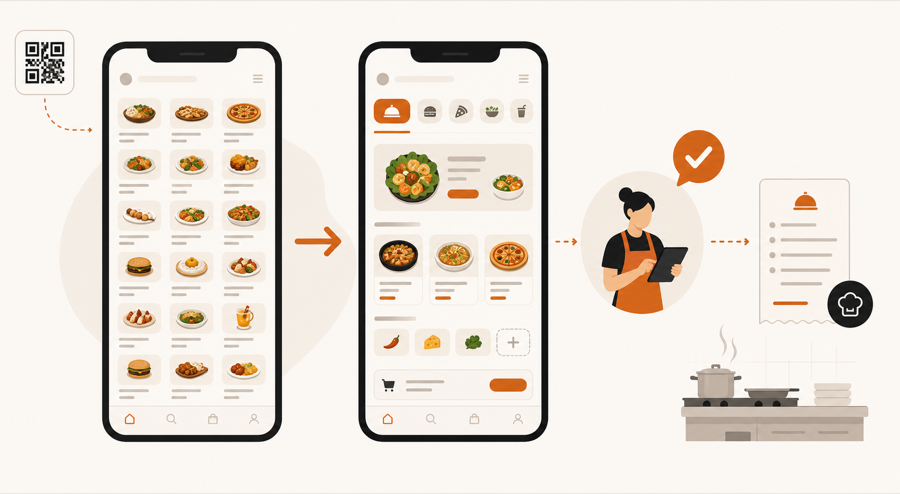
It is about making the menu easier to understand, easier to update, and easier to run during service. A QR menu can help because it is not limited to one printed layout. You can adjust category order, feature seasonal items, hide sold-out dishes, and make item details easier to scan on a phone.
The goal is not to push guests into random choices. The goal is to make good choices easier.
What menu engineering means
At a basic level, menu engineering looks at two things:
| Question | Why it matters |
|---|---|
| What do guests order often? | Popular items deserve clear placement |
| Which items are worth promoting? | Better-margin items should not be buried |
| Which dishes create kitchen pressure? | The menu should not overload one station |
| Which items need explanation? | Guests should understand before asking staff |
A digital QR menu gives the restaurant more room to act on those answers.
Why QR menus change the problem
A printed menu is fixed until the next print run. A PDF menu is easier to replace, but it is still a static file.
A live QR menu can be changed during normal restaurant work:
- move a popular item higher
- add a limited special
- hide a sold-out dish
- improve a confusing description
- group items by service moment
- keep allergen and modifier notes clearer
That is why menu engineering fits naturally with a live restaurant QR menu. You can improve the menu without reprinting every table QR code.
Keep the phone screen calm
The phone screen is small. A QR menu fails when it tries to show everything at once.
Better QR menus usually do this:
- start with clear categories
- keep item names short
- use photos only where they help
- separate modifiers from the main description
- make specials easy to find
- avoid long walls of text
- keep sold-out items out of the guest's way
If guests need to work too hard, they call staff anyway. The QR menu should reduce questions, not create new ones.
Connect choices to operations
Menu engineering should not stop at the guest screen.
When guests order from the table, the menu choice becomes restaurant work. That means the item, modifier, table, and guest note should stay connected until staff reviews it.
This matters because a beautifully arranged QR menu can still create chaos if every guest action goes straight to the kitchen without context.
For restaurants using table ordering, the better flow is:
- guest scans the table QR
- guest chooses from a clear menu
- staff reviews the request with table context
- kitchen receives approved work
That is the same reason QR ordering with staff approval matters.
A practical menu engineering checklist
Before changing your QR menu layout, ask:
| Check | Good sign |
|---|---|
| First screen | Guests can pick a category without thinking too much |
| Specials | Daily or seasonal items are visible, but not noisy |
| Modifiers | Guests understand choices before sending the order |
| Sold-out items | Staff can hide them quickly |
| Kitchen pressure | The menu does not push too many items to one station |
| Staff review | Orders still pass through staff before kitchen handoff |
Small improvements often work better than a full redesign. Move one category, rewrite three item descriptions, or test one special section first.
What to avoid
Avoid treating the QR menu like a storage place for every possible item.
Common problems:
- too many categories
- duplicate item names
- photos for every dish, even weak ones
- unclear modifiers
- specials hidden below the full menu
- old items still visible
- guest notes reaching kitchen without staff review
The best QR menu is not the longest menu. It is the menu guests can use during a real service moment.
Further reading
- Cornell's eCornell explains menu design and engineering as a way to categorize items by profitability and sales volume in Menu Design and Engineering.
- Lightspeed explains contribution margin, food cost, and item performance in Menu Engineering: How to Make a Profitable Restaurant Menu.
- TouchBistro explains menu engineering as the study of item profitability, popularity, and placement in Restaurant Menu Engineering.
Where MenuSuite fits
MenuSuite treats the QR menu as part of restaurant operations, not a separate file.
Guests scan from the table and choose from the live menu. Staff keeps control before kitchen handoff. Menu changes, table context, and order review stay connected so the QR menu supports service instead of becoming another disconnected channel.
If you are still comparing formats, start with QR menu vs PDF menu. If you want the broader benefit picture, read QR menu benefits for restaurants.