
Practical guide
Table ordering system
A practical guide to table ordering systems for restaurants where guests can act from the table while staff keeps control.
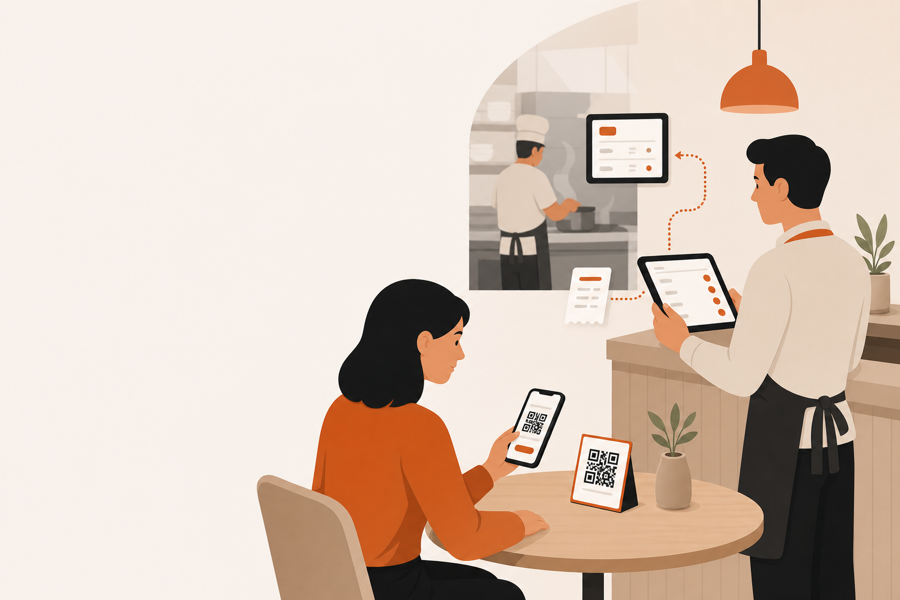
A table ordering system is more than a QR menu
A QR menu lets guests read. A table ordering system lets guests act.
That action can be simple: order another coffee, ask for a waiter, request the bill, or pay from the table. The important part is not the phone screen. The important part is what happens after the guest taps.
If the restaurant team cannot see the table, review the request, and hand work to the right place, the system becomes another disconnected channel.
What guests should be able to do
A useful table ordering system should help guests do small table actions without waiting for the next staff pass.
Common actions include:
- browse the live menu
- add items from the table
- send a waiter call
- ask for the bill
- review payment options
- split or settle the bill when payment is enabled
The flow should feel short. Guests should not need to download an app, create an account, or guess whether the restaurant received the request.
What staff still controls
Self-service should not remove hospitality from the room.
Staff still needs to control:
- whether an order moves to the kitchen
- whether a request needs a waiter first
- table timing
- payment or bill status
- unavailable items
- unclear notes or guest mistakes
That is why table ordering works best when staff review is built into the flow. Guests move faster, but the team still decides what becomes operational work.
For the approval side of this, read QR ordering with staff approval.
Where kitchen handoff fits
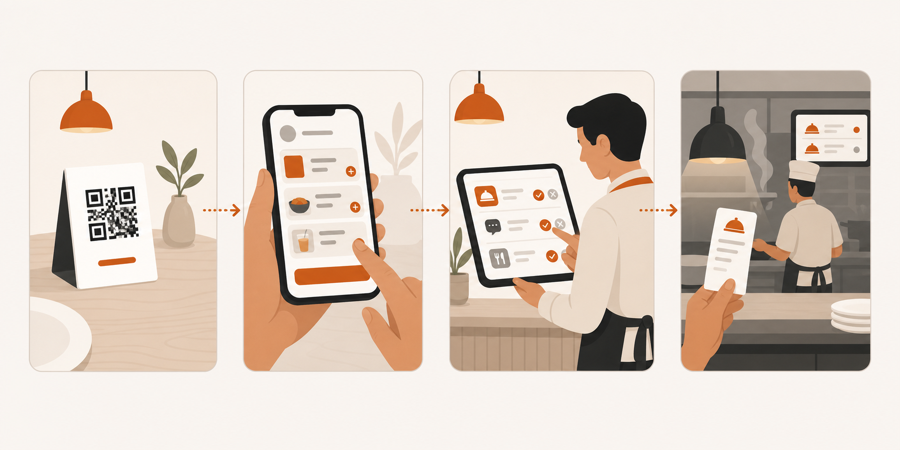
The kitchen should receive clear work, not every raw tap from the table.
A good table ordering system keeps the path clean:
| Step | What should happen |
|---|---|
| Guest scans the table QR | The system knows the table context |
| Guest sends an action | The action appears for staff with table context |
| Staff reviews it | The team approves, adjusts, or handles it manually |
| Work moves forward | Kitchen or service receives the right next step |
This is the difference between table ordering and a simple order form.
What to check before choosing one
Before choosing a table ordering system, ask these questions:
- Does the QR code know the table?
- Can staff review actions before kitchen work starts?
- Can guests ask for service, not only order food?
- Can the same flow support bill requests?
- Can payment status stay visible to staff?
- Is the system still usable when the restaurant is busy?
If the answer is no, the restaurant may only be adding another screen. If the answer is yes, the table flow can remove waiting without losing control.
Further reading
- The National Restaurant Association has a useful operator technology snapshot in Where operators plan to invest in tech.
- Square explains the broader table-service pattern in Tableside ordering and pay at table.
- For academic background on QR code menu satisfaction, see Enhancing customer loyalty through QR code menu system.
Where MenuSuite fits
MenuSuite treats table ordering as a service workflow, not only a guest menu.
Guests scan the table QR code and act from their phone. Staff keeps table context, reviews work before kitchen handoff, and can keep service requests and bill requests in the same operating flow.
If you are still deciding whether you need a menu or a workflow, start with QR menu vs QR ordering system. If the end of the meal is the bigger bottleneck, read Pay at the table with mobile payments.