
Buyer guide
QR menu benefits for restaurants
A practical guide to the real benefits of QR menus, and where restaurants need more than a menu link.

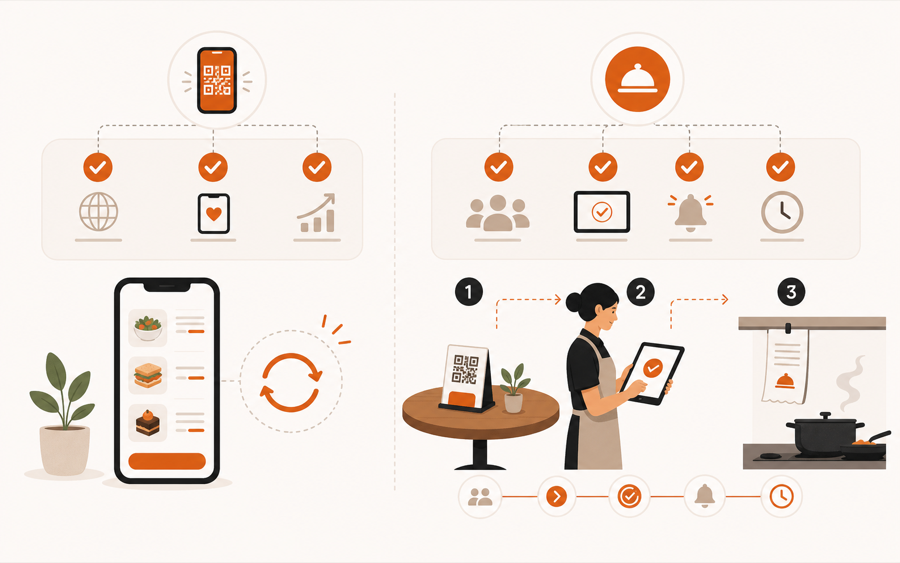
The real benefit is not the QR code
A QR code is only the door.
The benefit comes from what opens after the scan: a readable menu, live updates, table context, service actions, or staff-controlled ordering.
That difference matters. A restaurant can add a QR code and still frustrate guests if the menu is slow, hard to read, or disconnected from service.
Faster menu access
The first benefit is simple: guests can open the menu without waiting for a printed copy.
This helps most when:
- tables turn quickly
- staff is busy during peak hours
- outdoor seating makes menu delivery slower
- guests want to browse before staff returns
- printed menus are not always nearby
Fast access does not mean guests should be abandoned. Staff still matters. QR should remove waiting, not remove hospitality.
Easier menu updates
QR menus make menu changes easier than printed menus or static PDF files.
Restaurants can update:
- prices
- sold-out items
- daily specials
- photos
- allergen notes
- seasonal categories
This is one of the clearest QR menu benefits. If the menu changes often, a live menu saves repeated printing and avoids awkward moments where old menus show old information.
If your current QR code opens a PDF, read QR menu vs PDF menu.
Better guest information
A phone menu can carry details that paper often cannot.
Guests can see ingredients, photos, sections, notes, and item details without crowding the printed menu. This helps guests decide faster and can reduce repeated staff questions.
The menu still needs restraint. More information is useful only when it is organized. A long, cramped digital menu creates the same problem as a bad paper menu.
Less printing friction
Paper menus still have value, especially as backup. But they become work when the restaurant changes prices, removes items, or updates specials.
A QR menu can reduce:
| Printing problem | QR menu benefit |
|---|---|
| Old prices on tables | live updates |
| Sold-out dishes still visible | easier availability changes |
| damaged or stained menus | fewer reprints |
| limited space for details | expandable item information |
| frequent seasonal updates | less design and print work |
For the paper decision, read QR menu vs paper menu.
Where QR menu benefits stop
A QR menu does not automatically fix service.
Browse-only QR menus usually do not know the table, do not create an order queue, do not ask staff to approve anything, and do not hand clean work to the kitchen.
So the benefit depends on the goal:
| Restaurant goal | Needed tool |
|---|---|
| Guests read the current menu | QR menu |
| Staff keeps taking every order | QR menu |
| Guests order from the table | QR ordering system |
| Staff reviews before kitchen work | QR ordering system |
| Service requests and bill requests stay connected to the table | QR ordering system |
For that difference, read QR menu vs QR ordering system.
Staff control is the bigger upgrade
The strongest benefit appears when the QR menu becomes part of a controlled service flow.
Guests can act faster, but staff still reviews what happens next. This protects the kitchen from raw guest noise and keeps service decisions with the team.
That is especially useful when a restaurant wants:
- table-aware orders
- waiter calls
- bill requests
- notes before kitchen handoff
- fewer manual relays between floor and kitchen
At that point, the benefit is no longer only digital menu publishing. It is smoother service.
Practical checklist
Before choosing a QR menu tool, ask:
- Is the menu easy to read on a phone?
- Can staff update items without rebuilding a PDF?
- Do guests still have a paper backup if they need one?
- Does each table need its own context?
- Should staff approve guest actions before kitchen work?
- Should service requests live beside orders?
If the first three are enough, a QR menu may solve the problem.
If the last three matter, look for a QR ordering workflow with staff control.
Where MenuSuite fits
MenuSuite starts with a live QR menu, then connects the scan to real service.
Guests can browse from the table, request help, ask for the bill, or place an order. Staff keeps review before kitchen handoff, so the QR flow supports the restaurant instead of bypassing it.
If you are still defining the basics, start with What is a QR menu?. If you are weighing cost, read the QR menu pricing guide. If you already know you need table action, compare QR menu software.
Further reading
- Square explains common QR use cases in QR code generator and QR code ideas.
- For academic background on QR code menu satisfaction, see Enhancing customer loyalty through QR code menu system.