
Buyer guide
QR menu vs paper menu
A practical guide to deciding whether restaurants should replace printed menus, keep them, or use both.
The honest answer
Most restaurants should not treat QR menus and paper menus as enemies.
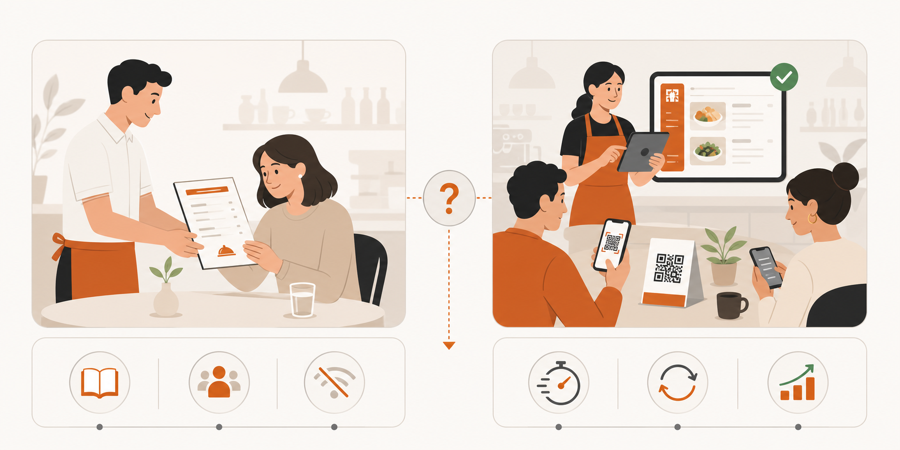
A paper menu is familiar, fast, and useful for guests who do not want to use a phone. A QR menu is easier to update, easier to expand, and better for showing live details such as availability, photos, notes, and service actions.
The best choice depends on the service style. Some restaurants can replace paper. Many should keep a small printed backup while using QR as the live menu.
What paper menus still do well
Paper menus are still useful because they do not ask anything from the guest.
No battery. No camera. No connection. No phone sharing at the table. A guest can sit down, open the menu, and start reading.
Paper is especially helpful for:
- guests who prefer not to scan
- older guests or families sharing one phone
- poor mobile signal areas
- quick specials handed out by staff
- backup service when a device or network fails
That is why removing every printed menu can create unnecessary friction. A few clean backup menus can make the QR rollout feel more hospitable.
Where paper menus slow the restaurant down
Paper becomes harder when the menu changes often.
Price updates, sold-out dishes, seasonal items, allergen notes, and photo changes all create printing work. Old copies can stay on the floor. Staff may need to explain that the printed menu is not current.
Common paper menu problems:
| Problem | What happens in service |
|---|---|
| Prices change | Old menus can create awkward guest conversations |
| Items sell out | Staff must explain after guests choose |
| Allergens or notes change | Updates take longer to reach the table |
| Menus get damaged | Reprints become routine work |
| Guests want more detail | Paper has limited space for photos and notes |
Paper is stable, but that stability can become a problem when the restaurant needs live information.
What QR menus do better
A QR menu is strongest when the menu needs to stay current.
Guests scan the table code and see the latest version. Staff can update items without reprinting. The menu can include clear categories, dish photos, allergen hints, availability, and language-friendly descriptions.
If the restaurant later wants table actions, the QR menu can also become the starting point for waiter calls, bill requests, or ordering. That is where the decision moves from a simple QR menu to a QR ordering system.
For that difference, read QR menu vs QR ordering system.
Why hybrid is usually safest
For many restaurants, the right setup is:
- QR menu as the main live menu.
- A small number of printed menus as backup.
- Staff trained to offer paper without making it awkward.
- Clear table QR codes that open the menu quickly.
- Paper menus updated less often, QR menu updated whenever needed.
This avoids the harsh version of QR rollout where guests feel forced to use their phone. It also avoids the old paper-only problem where every change becomes a print job.
Simple decision guide
Use this rule:
| Restaurant situation | Better fit |
|---|---|
| Guests strongly expect printed menus | Keep paper backup |
| Menu rarely changes | Paper can still work |
| Prices or availability change often | QR menu |
| Guests ask for photos, allergens, or more detail | QR menu |
| Staff wants guests to order or request service from the table | QR ordering system |
If the goal is guest comfort, keep paper available. If the goal is live menu control, use QR. If the goal is table action, use a QR ordering workflow.
When to remove paper menus
Removing paper makes sense only when the QR experience is genuinely better than paper for your guests.
Consider removing most paper menus when:
- QR scan opens fast.
- The menu is readable without zooming.
- Staff can help guests who prefer paper.
- The restaurant has a backup plan for network or device issues.
- The QR menu carries information paper cannot easily carry.
If those basics are not in place, paper removal may create more complaints than savings.
Where MenuSuite fits
MenuSuite is designed for restaurants that want the QR menu to support real service, not only replace a printed page.
Guests can scan from the table and browse a live menu. When the restaurant is ready, the same table flow can support service requests or staff-approved ordering before kitchen handoff.
If you want the upside before choosing a tool, read QR menu benefits for restaurants. If you are still deciding whether your current QR setup is enough, read QR menu vs PDF menu next. If you run a smaller venue, read QR menu for cafes. If you run a drink-led venue, read QR menu for bars. If guests complain about QR menus in general, read Why QR menus fail in restaurants.
Further reading
- Square explains printed and digital menu planning in How to make a restaurant menu.
- For academic background on QR code menu satisfaction, see Enhancing customer loyalty through QR code menu system.